

In today’s digital world, the biggest threat to your security is not a hoodie-wearing super-hacker from a Hollywood movie. It is something far more ordinary and far more dangerous: a single email.
Cybercriminals know this very well. They know that people are the weakest link in any security chain, which is why they target humans first, not systems.
Don’t Be an Easy Target
What if I told you that you can learn to think like a scammer and spot their tricks in just a few seconds?
You really can. And no, you don’t need movie-level technical skills. You just need to understand psychology. Below, I will take you inside the mind of an online fraudster and give you the tools to become the strongest line of defence, for yourself and for your company.
Hacking the Mind: Six Manipulation Triggers Scammers Rely On
Before we dive into real-world phishing examples, it’s important to understand why scams work in the first place. Social engineering is nothing more than emotional manipulation – and it targets our most basic human instincts. Once you learn to recognise these triggers, scammers lose their power. Here are the six most common manipulation tactics they use:
- URGENCY
“Your account will expire in 15 minutes!”, “This offer is valid today only!”
Goal: force you to act immediately, without thinking.
- FEAR
“Someone has accessed your account without authorisation!”, “We detected suspicious activity!”
Fear pushes us into rushed decisions – anything to protect ourselves.
- AUTHORITY
“The CEO is requesting an urgent payment.”
When we believe a request comes from an authority figure, like a manager, a bank, or a tax office, we are far less likely to question it.
- GREED
“Congratulations, you’ve won an iPhone!”, “You’re eligible for a tax refund!”
Who doesn’t like free stuff? Scammers count on that. If it seems unrealistically good, it’s almost certainly a scam.
- CURIOSITY
“See who mentioned you in their video!”, “Here are the photos from last night’s party.”
Curiosity is a powerful click-trigger.
- THE DESIRE TO HELP
“Hi, I’m a new colleague and I can’t log in — could you please share the Wi-Fi password?”
Attackers exploit our kindness and willingness to help.
If a message triggers a strong emotion, that’s your warning sign. Emotion is the scammer’s most powerful weapon.
Anatomy of a Scam: Six Red Flags Found in Almost Every Phishing Email
Now that you understand the psychology behind scams, it is time to get practical. Whether they are pretending to be your bank, a delivery service, or your internal IT team, phishing emails usually share the same mistakes. Learn to recognise them and you are already halfway to staying safe.
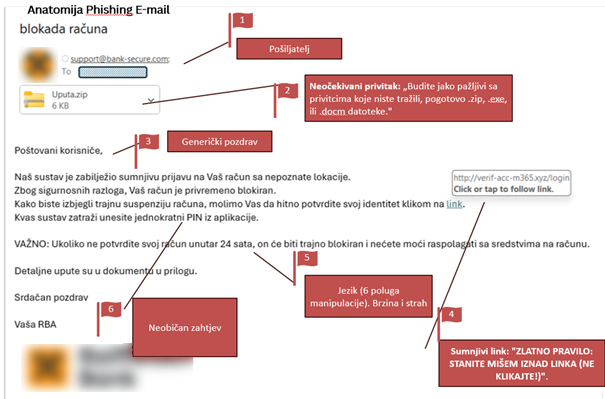
- SUSPICIOUS SENDER
Always check the sender’s domain – the part that comes after the “@” sign. For example, microsft.com instead of microsoft.com, or no-reply@company-mail.com instead of @company.com. At first glance, the sender’s email address may look legitimate. But if something feels even slightly off, take a closer look.
- UNEXPECTED ATTACHMENT
Be extremely cautious with attachments you didn’t ask for — especially .zip, .exe, or .docm files. If you are not expecting an invoice or a document, don’t open it.
- GENERIC GREETING
“Dear user,” or “Dear customer,” usually means the message was sent in bulk. Your bank and reputable companies know your name.
- SUSPICIOUS LINKS
The golden rule: NEVER click on a link without checking it first. Hover your mouse over the link (without clicking) and look at the URL that appears in the corner of your browser – that is the real destination. If the address looks strange, don’t click.
- PANIC-INDUCING LANGUAGE AND POOR GRAMMAR
If an email threatens you, creates urgency, pushes you toward illogical actions, or contains odd phrasing, grammar mistakes, or spelling errors – be highly suspicious. These are classic manipulation techniques.
- UNUSUAL REQUESTS
If someone asks you to do something you don’t normally do, like make an urgent payment or share a password – it is almost certainly a scam.
Your Superpower in Three Simple Steps
Okay, you now know how to spot the traps and tricks. What’s next?
Your defence plan is simple and built around three steps. Remember this formula: STOP – CHECK – REPORT!
- STOP!
The moment you feel pressure, fear, or any strong emotion – stop. Don’t take action. Take a deep breath and think. A scammer’s greatest enemy is your 10 seconds of rational thinking.
- CHECK!
Recall the red flags. Check the sender. Check the link. If you are unsure, verify through a different channel: if “the CEO” requests an urgent payment – call them, if “your bank” warns you about a problem – hang up and call the bank’s official number yourself.
- REPORT!
Spotted a phishing email? Great. Don’t just delete it – report it. Forward the message to your IT department. By doing so, you are not only protecting yourself, but also helping protect your colleagues. Your IT team can block the sender or link across the entire company. It is far better to report ten false alarms than to miss one real threat.
Digital security isn’t just an IT responsibility. It’s everyone’s responsibility – and a skill we can and should all master.
Once you learn to recognise manipulation tactics, you are no longer the weakest link. You become a critical part of the security system.
Sending our regards 🙂
Edgar, with the support of Goran Ujević, Chief Security & Information Security Officer at King ICT